WARP
Time, Volume & Pan Machine
macOS (Universal) + Windows · iLok · VST3 · AU · AAX
Pick How You Pay
One Payment And It Is Yours. Perpetual · Free Updates.
From 3 To 12 Months, No Interest. Yours After The Last Payment.
6 × $16.50, Then WARP Is Yours · $99.00 total, No Interest. Cancel Or Pay Off Anytime. USD.
WARP And The Other 48 Plugins. The Trial Covers All 49, Then $17.99/mo.
Try Free For 7 DaysmacOS (Universal) + Windows · iLok · New Plugins Drop Every Friday · Buy Goes Straight To Checkout.
Not Today? So It’s Easy To Find Again.
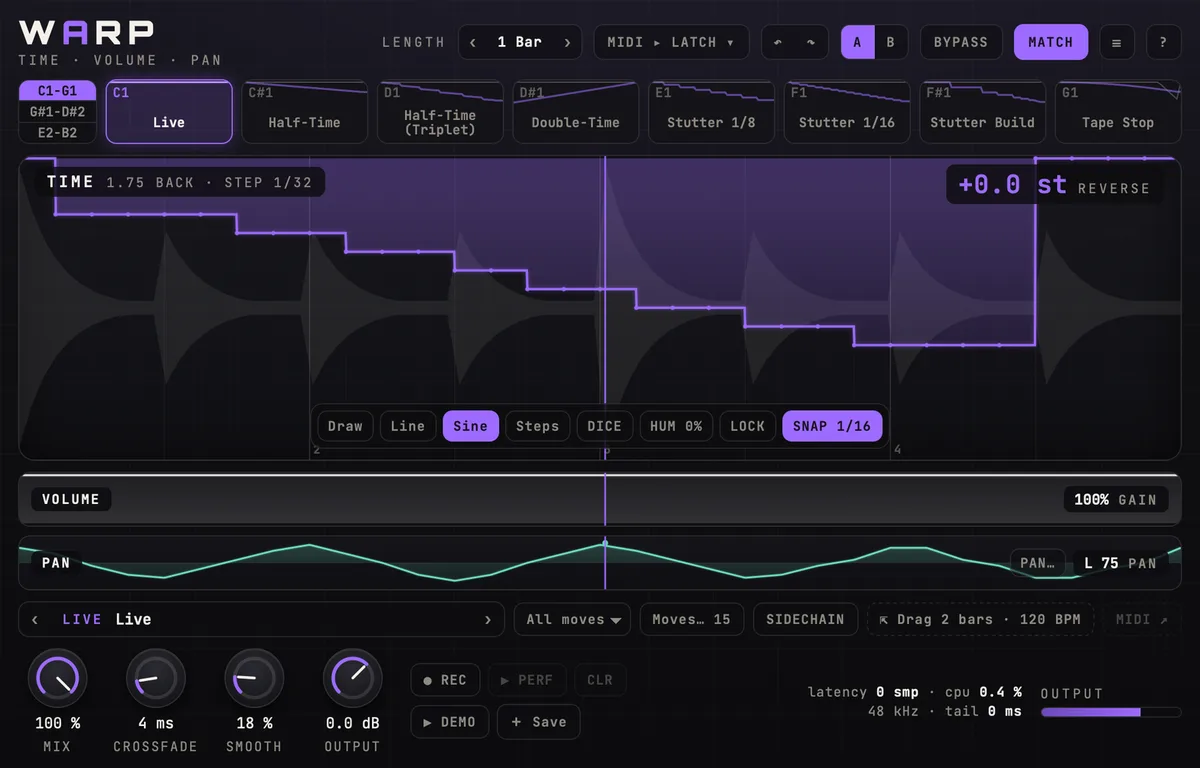
Half-Time, Stutters, Tape Stops, Reverses And Auto-Pans You Play From Your Keyboard. TIME, VOLUME And PAN Are Drawn Against The Bar, 24 Moves Sit On The Keys From C1 To B2 With 78 More In The Library, And A Recorded Pass Comes Back To Your DAW As Automation — Or Drags Out As MIDI.
Press One Key. The Whole Beat Halves.
Half-Time, Stutters, Tape Stops, Reverses And Auto-Pans On 24 Keys — Played By Hand, Quantised To The Grid, And Handed Back To Your DAW As Automation Or MIDI.
- 01TIME, VOLUME And PAN Lanes On One Bar, One Lane At A Time On The Big Screen
- 0224 Moves On C1–B2 — Latch, Momentary Or One-Shot, Quantised To The Grid
- 03102 Moves In All: The 24 On The Keys Plus 78 In A Genre Library
- 04Record The Performance As Host Automation, Or Drag It Out As MIDI Or Audio
- 05Zero Latency, A Loudness-Matched Bypass And A Real Output Gain

Blend The Warp.
Mix Sets The Dry/Wet Blend Of The Warped Signal.

Stutters, Stops, Reverses
Repeats, Freezes And Tape Stops Fall Out Of The Geometry.

24 Moves On MIDI Notes
C1 To B2: Latched, Momentary Or One-Shot.

Three Curves, One Bar
Time, Volume And Pan, Drawn Against Your Host's Tempo.

Play It By Hand
Drag The Audio, Or The Notes, Into Your DAW.
Time, Volume & Pan Machine
The Moves Everyone Wants On A Beat — The Half-Time Drop, The Stutter Into The Hook, The Tape Stop Before The 808 Comes Back — Usually Mean Drawing Them: A Curve Editor, A Mouse, And A Bounce You Redo Every Time The Arrangement Moves. And The Moment A Slice Boundary Lands On A Pad Or A Sub, It Clicks.
WARP Puts The Moves On Your Keyboard. Twenty-Four Sit On C1 To B2 — Latch, Momentary Or One-Shot, Quantised So A Late Press Still Lands On The Line — And 78 More Live In A Library Sorted By Genre. TIME, VOLUME And PAN Each Get The Big Screen When You Edit Them, Slice Boundaries Are Crossfaded, And When You Record A Pass The DAW Gets It Back As Automation, Or You Drag It Out As MIDI On The Same Keys You Played. Zero Latency, And Bypass Is Level-Matched.
In The Session
- 01Hold A Key For Half-Time Through The Pre-Chorus; Let Go And It Is Back On The Grid.
- 02Throw A Stutter Fill Into The Hook Without Drawing A Single Point.
- 03Pan The Repeats Across The Stereo Field On The PAN Lane.
- 04Record The Performance, Then Drag It Into The Session As MIDI.
Specs And Formats
- Version
- V1.2.1
- Formats
- VST3 · AU · AAX
- Runs On
- macOS + Windows
- Licensing
- iLok · No Dongle
- Installs Via
- Echelon Hub
WARP In A Pack
Any 3 Plugins For $199, Any 5 For $299, Owned Outright.
Pick the units; we’ll show you whether a pack beats buying them one at a time. Flagships (the $149+ units): the Pick 3 includes 1, the Pick 5 2; each beyond that is +$49.
Before You Run WARP.
Which DAWs Does WARP Work In?
Pro Tools (AAX); Logic Pro And GarageBand (AU, macOS); Ableton Live, FL Studio, Cubase, Studio One And Reaper (VST3). It Ships As VST3, AU, AAX On macOS And Windows. The Install Guide Covers Where Each Format Lands And How To Rescan If A Host Doesn't See It.
What Are The System Requirements?
macOS: macOS 11+ · Apple Silicon + Intel (Universal). Windows: Windows 10/11 · 64-Bit · VST3 + AAX. Licensing Is iLok; No USB Dongle Is Required.
Does WARP Add Latency?
Where The Engine Needs Lookahead Or Oversampling, WARP Reports Its Latency To Your DAW, Which Compensates Automatically, So It Stays In Time With The Rest Of The Session. On A Live Input, Check Your Host's Low-Latency Or Monitoring Mode.
Can I Try WARP Before Buying?
Yes, Through The Subscription: The 7-Day Trial Covers Every Unit, WARP Included, With Nothing Charged Until It Ends. Individual Plugins And Bundles Don't Have Separate Trials.
Do I Need An iLok Dongle?
No. The License Lives On Your iLok Account And Can Be Activated To Your Computer, To iLok Cloud, Or To A USB Key — Your Choice.
How Do I Install It?
Through The Echelon Audio Hub: Sign In Once, And It Installs, Updates And Rolls Back Every Unit You Own Or Subscribe To.
Are Updates Free?
Yes. A Perpetual WARP License Includes Every Update To WARP; Subscribers Get Updates And Every New Unit As It Lands.
What If It Doesn't Work For Me?
Perpetual Licenses Have A 7-Day Refund Window From Purchase, As Long As The License Is Surrendered From Your iLok Account. On The Subscription, Cancelling Inside The Trial Means You Pay Nothing. If Something Is Broken And Support Can't Fix It, We'll Make It Right Regardless.
System Requirements
| Version | V1.2.1 |
|---|---|
| Formats | VST3 · AU · AAX |
| macOS | macOS 11+ · Apple Silicon + Intel (Universal) |
| Windows | Windows 10/11 · 64-Bit · VST3 + AAX |
| Licensing | iLok · Machine, Cloud Or USB |
| Delivery | Echelon Audio Hub |
Goes With WARP
Run WARP Tonight.
All 49 Units Free For 7 Days, Or Own WARP Outright For $99.