Echelon AudioEchelon Audio
Closed beta · Wave 1 · invite only

18 plugins.
Three formats.
Your sessions.

The first eighteen units of the Echelon Audio fleet, in the hands of engineers who will tell us the truth about them.

Units18 plugins

Vocal chain, dynamics & master, tone, space, instruments, studio tools

FormatsAU · VST3 · AAX

Universal macOS — Apple Silicon + Intel

FocusA tone beta

Not a crash beta — how it sounds, how it feels

WindowCloses August 8, 2026

Licenses via iLok run until August 30, 2026

How the round works

03 STEPS · NO CEREMONY
01

Create an account & apply

Two minutes. Tell us your DAW, your machine and what you make. We accept in waves — no timing promises.

02

Licenses land on your iLok

All 18 plugins deposited to your iLok account — machine, iLok Cloud or USB. Beta licenses run until August 30, 2026.

03

Use them on real sessions

Three sentences from a real session beat a form filled out from memory. Feedback closes August 8, 2026.

The eighteen

UNITS 01–18 · WAVE 1

Every unit carries a “what we'd love your ears on”list — not a QA checklist, just the things we're most curious how you'll react to.

UNIT 01 / 18Vocal

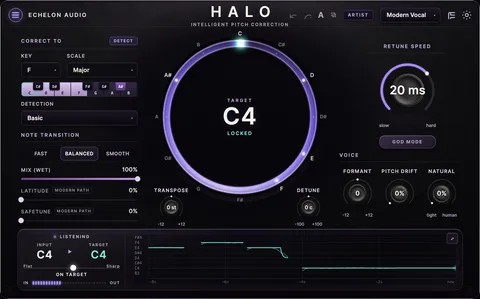
HALO

vocal pitch corrector

A clean, natural vocal pitch corrector with transparent tuning and fast retune for the modern hard-tuned sound. From invisible to full effect.

  • YIN + phase-vocoder tuning
  • Fast retune for hard-tuned vocals
  • Natural → full effect
  • Key & scale lock
+ What we'd love your ears on− What we'd love your ears on
  1. Put it head to head with the tuner you use now, same vocal, matched level. Tell us where Halo wins — and be just as specific about where the other one still has us beat.
  2. Drop it on a vocal inside a full beat and confirm everything still lines up. Halo reports ~1145 samples for your host to compensate; if you ever hear the drums flam, that's a great catch and we'll want to know which DAW.
  3. Take retune all the way up on a slide or a run. That's the modern hard-tuned sound — tell us whether it lands where you'd want it.
  4. Try it on a low male vocal and a high female one. We'd love to know where the tracking impresses you most.
HALO interface
HALO — plugin interface
UNIT 02 / 18Vocal

VOICES

scale-aware harmony engine

Turn one voice into a section. VOICES listens to your key and writes real harmony voicings — thirds, stacks, spreads — with humanized timing and pitch.

  • Scale-aware harmony voicing
  • Up to 8 humanized voices
  • Spread, tightness & vibrato per voice
  • Key-locked — never a sour note
+ What we'd love your ears on− What we'd love your ears on
  1. See if you can find its limits. Set the key, then sing something chromatic or bend into a note. Staying musical through that is the whole promise — and if you ever do hear a sour voice, that's a brilliant catch (send the key and roughly what you sang).
  2. Stack 8 voices on an ad-lib. Does it read as a real section? That's the sound we were chasing.
  3. Push the range with very low and very high source notes — voices fold back into range, and we'd love to know whether that always sounds like a choice.
  4. Change key mid-session and tell us it keeps up.
VOICES interface
VOICES — plugin interface
UNIT 03 / 18Vocal

POCKET

one-fader vocal compressor

The vocal fader that mixes itself. One control takes a raw take to a dense, present, radio-ready vocal — with WARM and GRIT color when you want attitude.

  • One-fader density compression
  • Gate + program-dependent release
  • WARM / GRIT harmonic color
  • Auto-makeup that actually works
+ What we'd love your ears on− What we'd love your ears on
  1. See how far one fader gets you. If you can finish a vocal without reaching past it, that's exactly the result we designed for — tell us if it happened, and if you did reach past it, what for.
  2. WARM and GRIT on a bright vocal. Where's your sweet spot, and where does it become more attitude than you'd want?
  3. The gate on a noisy room take — does it clean it up without eating word starts?
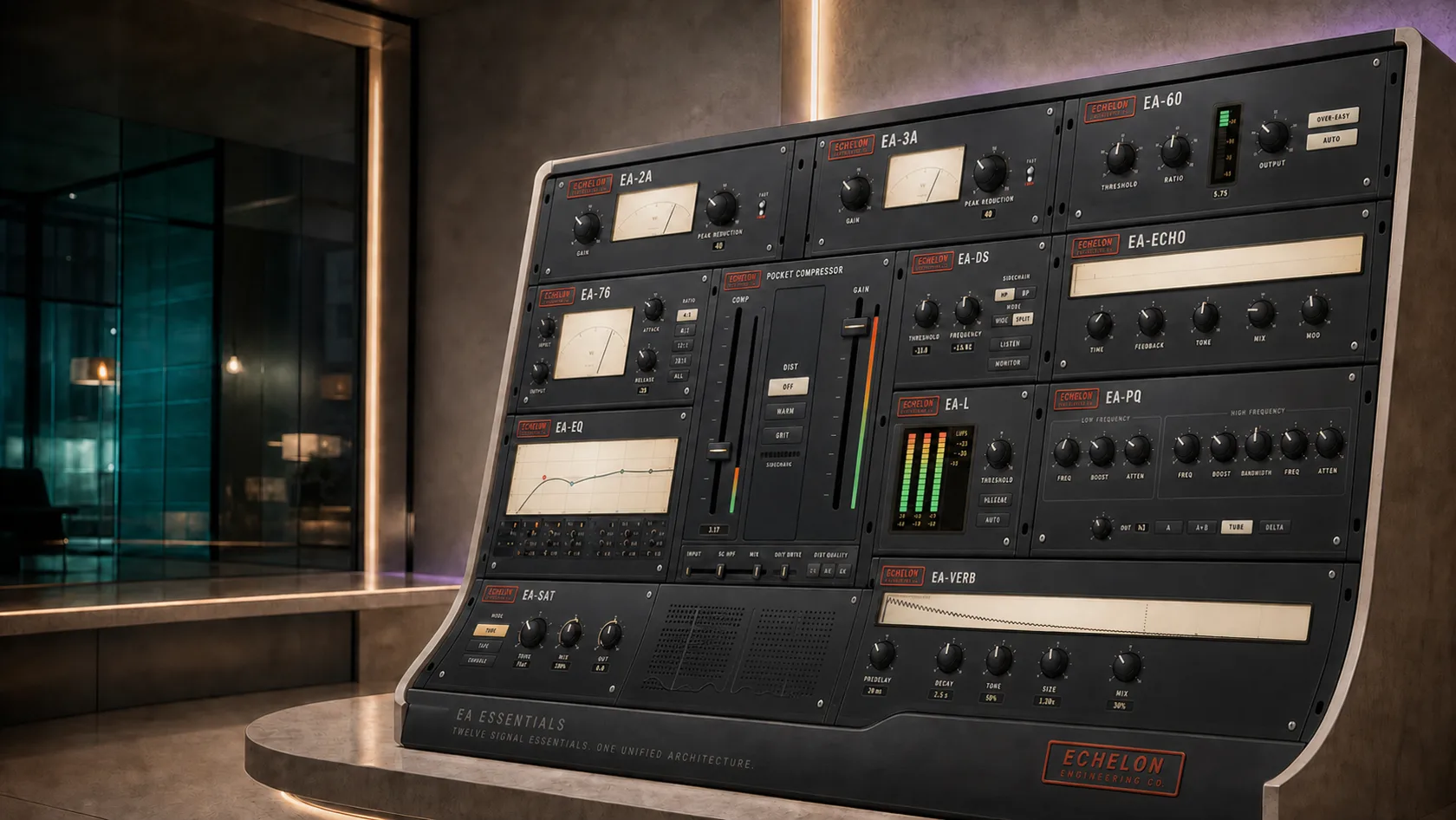
  4. Pocket is the $39 representative for all 12 Essentials units — they share one chassis, so anything you notice here helps the whole family.
POCKET interface
POCKET — plugin interface
UNIT 04 / 18Vocal

LARYNX

vocal channel strip

An all-in-one vocal channel strip — HPF, gate, comp, de-ess, EQ and saturation — with a live note readout. A finished vocal in a single plugin.

  • HPF → gate → comp → de-ess → EQ → sat
  • Live note readout
  • 7 modules in one strip
  • A finished vocal in one plugin
+ What we'd love your ears on− What we'd love your ears on
  1. Bypass-toggle it right after you insert it. Larynx loads deliberately gain-forward so it feels finished out of the box. Tell us whether that lands for you or comes in a few dB hot — and if it's hot, the number you pulled back is the most useful thing you can send us.
  2. Work left to right through all seven modules on one take, and tell us which ones you'd keep and which you'd never touch. We'd rather ship six great modules than seven okay ones.
  3. The new 6-band EQ module is the freshest thing in here — we'd really like your read on it.
  4. Does the live note readout match what you're singing?
LARYNX interface
LARYNX — plugin interface
UNIT 05 / 18Dynamics

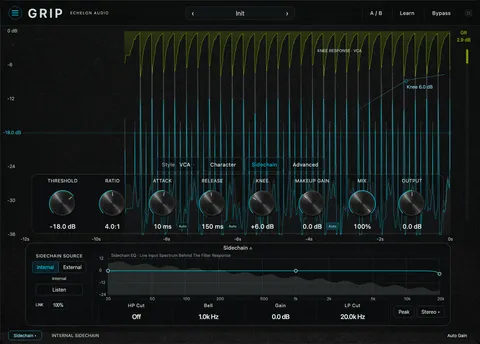
GRIP

7-style compressor

A 7-style compressor spanning transparent VCA, vibey opto and upward compression, with character saturation and up to 16× oversampling. Surgical control with analog attitude.

  • 7 styles — VCA, FET, Opto, Bus, Upward & more
  • Up to 16× oversampling
  • Character saturation + parallel mix
  • Sidechain EQ, M/S & 6 channel modes
+ What we'd love your ears on− What we'd love your ears on
  1. Grip set the interaction grammar for the whole fleet — its undo, A/B and knob feel were copied into roughly twenty other plugins. If it feels right here, it feels right everywhere, so your read on how it handles is the highest-leverage note on this page.
  2. All 7 styles on the same drum bus, matched in level. Do they read as seven genuinely different compressors? Tell us your favourite and what you'd use it on.
  3. 16× oversampling on a busy session — let us know your machine and where the CPU lands, so we can publish honest numbers.
  4. Sidechain EQ on a kick-heavy bus. Does filtering the detector do what your ears expect?
GRIP interface
GRIP — plugin interface
UNIT 06 / 18Dynamics

CREST

true-peak limiter / maximizer

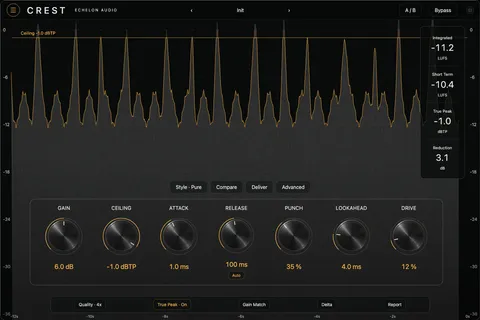
A true-peak limiter and maximizer with 8 styles and full loudness metering. Push to streaming targets loud and clean — with auto-gain to hit your LUFS goal.

  • 8 limiter styles — transparent → aggressive
  • True-peak safe for streaming
  • Auto-gain to your LUFS target
  • Gain-reduction history
+ What we'd love your ears on− What we'd love your ears on
  1. Check our numbers against yours. Put Youlean or your DAW's loudness meter after Crest — we're confident they'll agree, and we'd love the confirmation from a machine that isn't ours. If they don't, that's a top-priority catch.
  2. Compare it to your current limiter at matched loudness, not matched gain. Tell us which one you'd pick, and on what kind of material.
  3. Push it 6 dB past sensible on a dense mix and tell us which of the 8 styles holds together best. That's the one we'll put in the demo.
  4. Set a −1 dBTP ceiling and encode to AAC/MP3 — confirm it stays under after the codec.
CREST interface
CREST — plugin interface
UNIT 07 / 18Master Bus

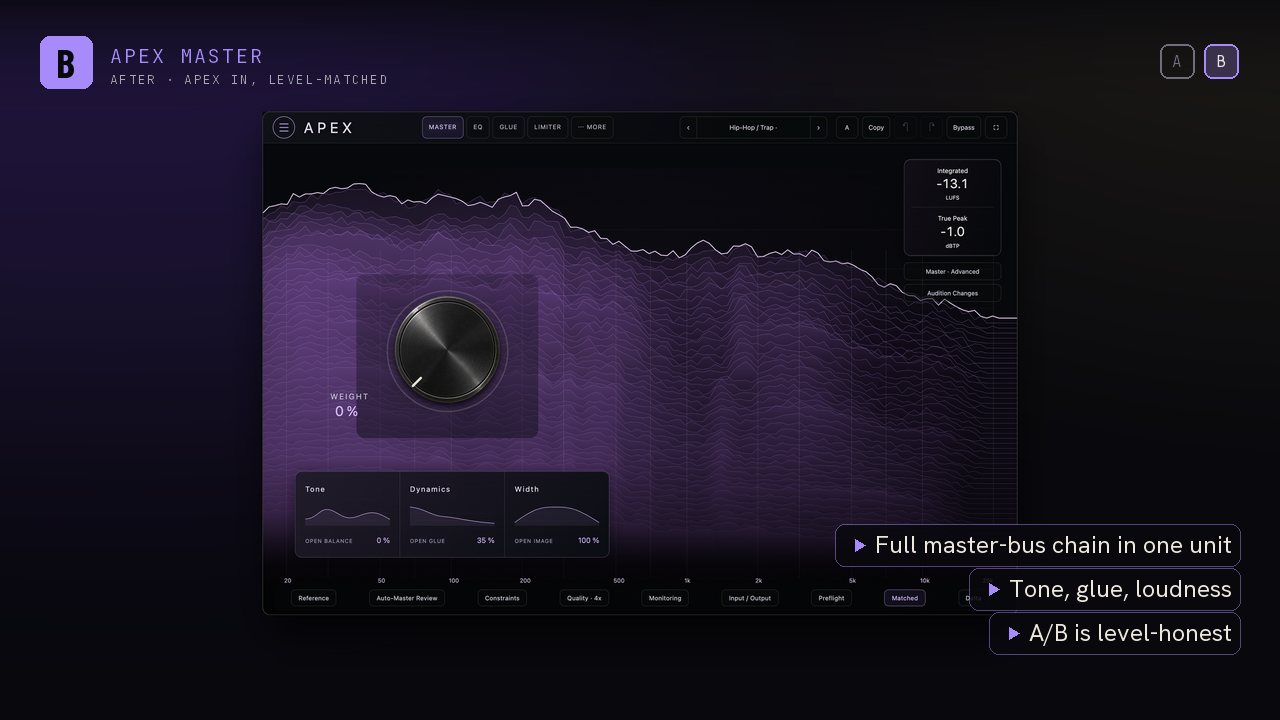
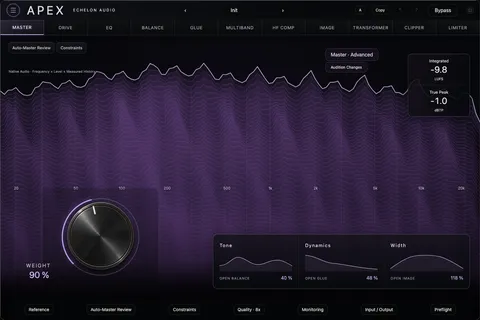
APEX

master-bus processor

A mastering-grade master-bus processor — console-style glue, a harmonic enhancer and a true-peak clipper in one chain. Drop it on your 2-bus for width, weight and loudness without the guesswork.

  • 3 stages — glue, enhancer, clipper
  • One-knob WEIGHT macro
  • LUFS + true-peak metering
  • Per-stage visualizers
+ What we'd love your ears on− What we'd love your ears on
  1. WEIGHT on a mix you already finished. One knob, nothing else. If it improves a mix you were already happy with, that's the story we want to tell at launch — and we'd love to hear it in your words.
  2. Push the clipper on a mix with hot 808s. How far can you push before you'd back off? That number is genuinely useful.
  3. Verify the LUFS and true-peak readouts against an independent meter — same ask as Crest, and just as valuable.
  4. Does bypassing Apex leave you level-matched, so you're judging tone and not volume?
APEX interface
APEX — plugin interface
UNIT 08 / 18EQ

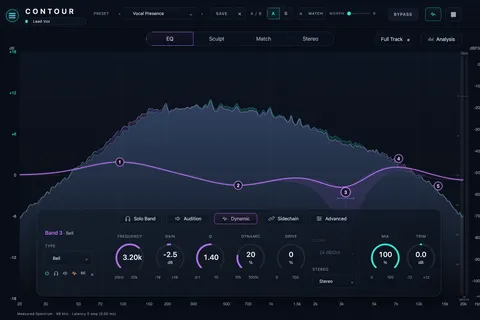
CONTOUR

surgical dynamic EQ

A surgical, dynamic EQ with a 24-band cascade and a high-resolution analyzer. Carve problem frequencies with clinical precision — and let bands react dynamically only when they need to.

  • 24 surgical bands + Butterworth cuts
  • Dynamic mode — bands move only when needed
  • High-resolution real-time analyzer
  • Visual & Minimal workflows
+ What we'd love your ears on− What we'd love your ears on
  1. Do a real corrective pass — a boxy room, a harsh vocal, a ringing snare — and tell us whether the workflow got out of your way. Contour is the unit our whole UI grammar was validated against, so it should feel finished; we'd love to hear that it does.
  2. Dynamic mode vs static on a vocal that's only harsh on the loud words. This is the feature we think sells the plugin — does it convince you?
  3. Node feel: fine control up near 10 kHz, Q with a modifier. Compared to the EQ you already reach for, what would make you switch?
  4. Analyzer with 24 bands live on a loaded session — tell us where the CPU sits on your machine.
CONTOUR interface
CONTOUR — plugin interface
UNIT 09 / 18Saturation

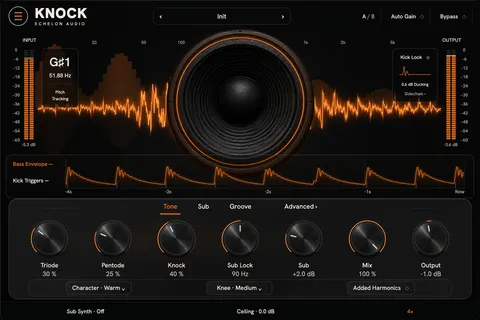
KNOCK

808 harmonic-knock saturator

An 808 harmonic-knock saturator with parallel triode/pentode drive and a clean sub-lock crossover. Make 808s and bass cut on any system while keeping the low end solid.

  • Parallel triode (even) + pentode (odd) drive
  • Sub-Lock keeps the fundamental clean
  • Pitch-locked Sub-Synth + attack Click
  • 808s that knock anywhere
+ What we'd love your ears on− What we'd love your ears on
  1. Check it on a phone or laptop speaker, then in the car. That's the whole job — the 808 has to read on a speaker with no low end and still feel solid on a system that has one. Tell us how it does on both.
  2. Sub-Synth on a gliding 808. Pitch-tracking through a slide is the trick we're most proud of here — let us know if it holds.
  3. Take the drive all the way up. We'd love a second opinion on how the harmonic density feels up there — richer, or busier than you'd want?
  4. Click on a soft 808 — does it give you usable attack?
KNOCK interface
KNOCK — plugin interface
UNIT 10 / 18Saturation

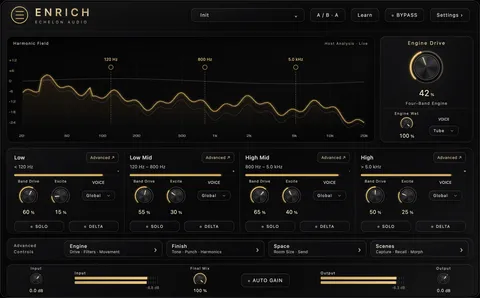
ENRICH

harmonic enrichment FX

Harmonic enrichment that adds body, sheen and excitement to thin sources. Make anything sound bigger and more finished.

  • SILK / TAPE / TUBE / CRUSH character
  • 2× / 4× / 8× oversampled
  • Body, sheen & excitement
  • Instant finished polish
+ What we'd love your ears on− What we'd love your ears on
  1. We'd like your call on one design question. Enrich has a full saturation core — four voicings, oversampled, measured clean — but drive comes from LOW/MID/HIGH/FILL rather than its own knob. Would you want a dedicated drive control, or does CHARACTER already get you there? Your answer decides how we build it.
  2. All four characters on a thin sample. Do SILK / TAPE / TUBE / CRUSH read as four distinct flavours? Tell us which one you'd default to.
  3. The one-plugin polish pass: throw it on something thin and see how finished it sounds with a single move.
  4. Listen for anything harsh on bright material — cymbals, hats — at the lowest oversampling setting.
ENRICH interface
ENRICH — plugin interface
UNIT 11 / 18Reverb

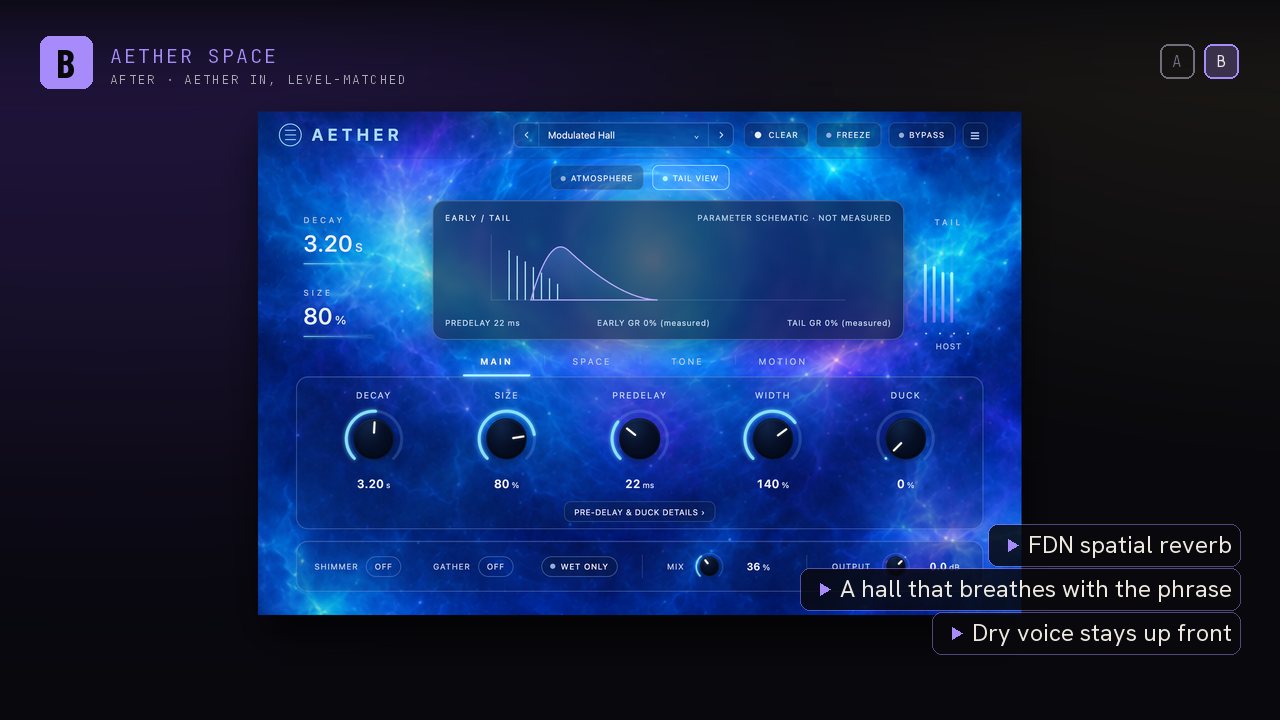
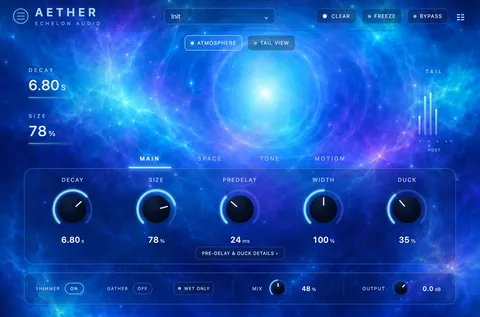
AETHER

FDN spatial reverb

A lush FDN spatial reverb with shimmer, freeze and modulation. From tight rooms to infinite clouds — the kind of space that makes vocals and synths float.

  • FDN reverb — rooms to infinite space
  • Shimmer & freeze
  • Modulated tails
  • 10 iconic-reverb presets
+ What we'd love your ears on− What we'd love your ears on
  1. Shimmer on a vocal tail. This is the sound Aether was built for — tell us if it floats the way you want it to, and which of the 10 presets you kept.
  2. Leave a long tail running for a few minutes while you work. Tails should sit perfectly still; if you ever hear one grow on its own, that's an excellent catch.
  3. Freeze, then keep playing into it. Does the frozen layer hold while new input sits cleanly on top?
  4. Run three or four instances as sends — real sessions have several reverbs, so let us know where the CPU lands on yours.
AETHER interface
AETHER — plugin interface
UNIT 12 / 18Delay

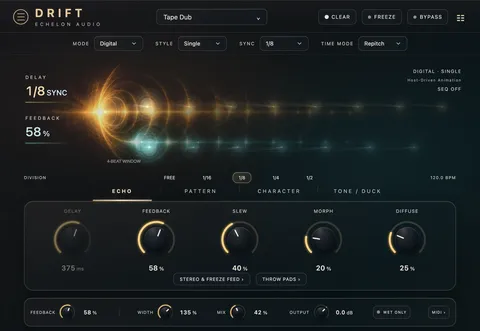
DRIFT

6-mode creative delay

A creative delay with 6 engines — tape, BBD, digital, ghost, pitch and reverse — and a live echo timeline. From subtle slap to evolving, pitched soundscapes.

  • Tape · BBD · Digital · Ghost · Pitch · Reverse
  • Live echo-timeline visualizer
  • Morph, ducking & freeze
  • Slap → evolving soundscapes
+ What we'd love your ears on− What we'd love your ears on
  1. Which of the six engines did you keep coming back to? Tape, BBD, Digital, Ghost, Pitch, Reverse — we want to know which one earns its place in your sessions and which one surprised you.
  2. Morph between two engines while audio is running. Smooth morphing is the party trick — tell us if it feels as good as it should.
  3. Ducking on a busy vocal — does the delay get out of the way and come back naturally?
  4. Tempo sync in an odd time signature (6/8, 5/4), with dotted and triplet divisions, then change the project tempo mid-playback. Confirm it stays locked.
DRIFT interface
DRIFT — plugin interface
UNIT 13 / 18Instrument

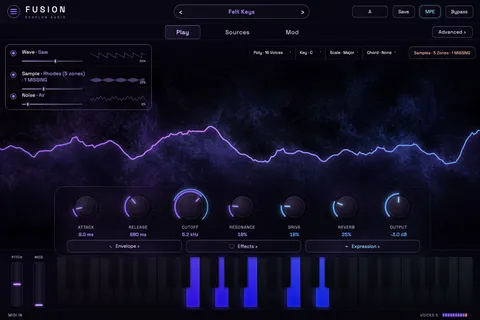
FUSION

hybrid multi-engine workstation

A hybrid multi-engine workstation synth combining sampling, synthesis and FX layers. One instrument for huge, modern sounds.

  • Multi-engine hybrid synth
  • Sample + synthesis + FX layers
  • Huge modern sounds
  • One instrument, endless tones
+ What we'd love your ears on− What we'd love your ears on
  1. Which patch made you want to write something? Name it. The preset that starts a song is worth more to us than any spec on the box.
  2. Find the voice ceiling — hold big chords with long releases until it complains, and tell us the machine and buffer size. Fusion shares its engine with Cadence and Arp, so that number helps three plugins.
  3. Sustain pedal and pitch bend from your own controller — does it feel like an instrument you'd perform on?
  4. Save a patch, reopen the session, confirm the exact sound comes back.
FUSION interface
FUSION — plugin interface
UNIT 14 / 18Instrument

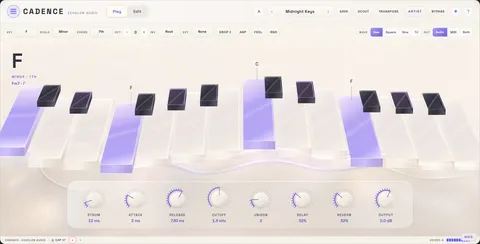
CADENCE

one-finger chords + scale-lock synth

A one-finger-chords, scale-locked synth — play in key with a single note and never hit a wrong chord. Songwriting on easy mode.

  • 9 scales × 7 chord types
  • One-finger diatonic chords + snap
  • Poly synth: detune, sub, ADSR, SVF
  • Strum, octave & wave control
+ What we'd love your ears on− What we'd love your ears on
  1. Check the theory in a scale you know cold. Play up the keyboard and confirm every chord is the one it should be. If they're all right, please say so — that's the promise of the plugin. If one isn't, it's the best catch you could hand us (name the scale, root and chord).
  2. Write something with one finger. Did it actually speed you up? That's the only real measure here.
  3. Strum at slow and fast settings — musical, or too mechanical for you?
  4. If you have Scout in the same session, confirm Cadence follows the detected key.
CADENCE interface
CADENCE — plugin interface
UNIT 15 / 18Instrument

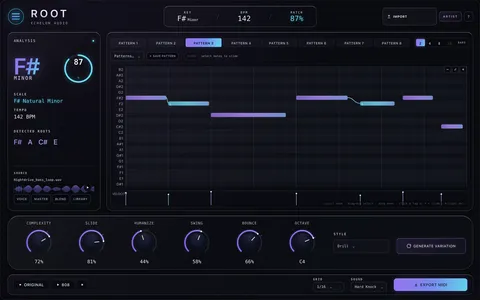
ROOT

audio → 808 bass engine

An audio-to-808 engine that detects your track's root and builds a matching 808 bassline with an editable piano roll. Perfect sub-bass, in key, every time.

  • Detects your track's root note
  • Builds a matching 808 line
  • Editable piano roll + MIDI drag-out
  • In key, every time
+ What we'd love your ears on− What we'd love your ears on
  1. Feed it loops whose key you already know and score the detection. Hits and misses are both useful — when it nails one you'd have had to hunt for, tell us; when it misses, tell us what the loop was.
  2. Drag the MIDI out into your arrange window. Right bar, right pitch, right note lengths — and tell us how that felt as a workflow.
  3. Groove/shuffle around 16–18% — we'd love independent confirmation that the timing sits where you expect in that range.
  4. Edit in the piano roll, close the session, reopen — your edits should be exactly as you left them.
ROOT interface
ROOT — plugin interface
UNIT 16 / 18Utility

SCOUT

key & tempo detector

Know the key before you play a note. Real-time key and BPM detection that broadcasts to every Echelon instrument in your session.

  • Real-time key detection
  • Accurate BPM tracking
  • EchelonLink broadcast to the fleet
  • Zero-latency analysis tap
+ What we'd love your ears on− What we'd love your ears on
  1. Score it against ten tracks you know the key of. Send us the hit rate — we're proud of it and we'd love to see it confirmed on material we've never heard.
  2. Watch the broadcast work. With Scout, Cadence, Root and Voices in one session, the key should reach all three by itself. It's our favourite trick — tell us if it lands.
  3. BPM on halftime and triplet-feel beats — does it lock to the multiple you'd want?
  4. How fast does it settle on a sparse intro?
SCOUT interface
SCOUT — plugin interface
UNIT 17 / 18Utility

OVERSEER

mix intelligence conductor

The conductor for your Echelon rack. OVERSEER listens across every instance in your session and suggests — then applies — the moves a mix engineer would make.

  • Cross-plugin mix intelligence
  • One-click APPLY with undo ledger
  • Listens to 50+ Echelon publishers
  • Session-wide gain staging
+ What we'd love your ears on− What we'd love your ears on
  1. Give it a real session first — 8 or more Echelon plugins across different tracks. Overseer only gets to show off when there's a rack to conduct; with one plugin loaded there's nothing for it to do. Then open it and tell us what you think of the suggestions.
  2. Does it see everything? Count what's in your session against what the mesh panel lists — a full house is the moment this plugin makes sense.
  3. APPLY, then undo. The move should land on exactly the plugin it named, and undo should put it all back. Tell us if the suggestion was one you'd have made yourself.
  4. Add and remove plugins while Overseer is open — it should keep up live.
OVERSEER interface
OVERSEER — plugin interface
UNIT 18 / 18Repair / FX

CLEANX

creative repair FX + radio edit

Creative repair and FX that cleans up audio while letting you flip it into something new — plus a one-click-per-word RADIO EDIT strip for clean versions.

  • Real-time creative repair FX
  • RADIO EDIT censor strip
  • BLEEP / MUFFLE / GARBLE / BACKSPIN
  • AudioSuite (offline) mode in Pro Tools
+ What we'd love your ears on− What we'd love your ears on
  1. Make a real clean version of a real song with the RADIO EDIT strip — one action per word — and time yourself against how long it takes you by hand. If we saved you real minutes, tell us how many; that's the headline claim we want to earn.
  2. Which censor sounds best? BLEEP, MUFFLE, GARBLE, BACKSPIN — tell us your pick, and whether it still hides the word after a mastering chain.
  3. Pro Tools users: run it as an AudioSuite render, not just as an insert. Offline processing is its own path and you're the only people who'll exercise it — we'd love to hear it behaves.
  4. With pitch processing on it reports 1024 samples for your host to compensate — confirm nothing drifts.
CLEANX interface
CLEANX — plugin interface
Want in?

Apply for the closed beta

Spots are limited and we accept in waves. An iLok account is optional at apply time — it's only required before licenses can be deposited.

Echelon Audio

Closed Beta — Round 1 · feedback closes August 8, 2026