FLIP
One-Press Flips For Melodic Loops
macOS (Universal) + Windows · iLok · VST3 · AU
Pick How You Pay
One Payment And It Is Yours. Perpetual · Free Updates.
From 3 To 12 Months, No Interest. Yours After The Last Payment.
5 × $13.17 + $13.15, Then FLIP Is Yours · $79.00 total, No Interest. Cancel Or Pay Off Anytime. USD.
FLIP And The Other 48 Plugins. The Trial Covers All 49, Then $17.99/mo.
Try Free For 7 DaysmacOS (Universal) + Windows · iLok · New Plugins Drop Every Friday · Buy Goes Straight To Checkout.
Not Today? So It’s Easy To Find Again.
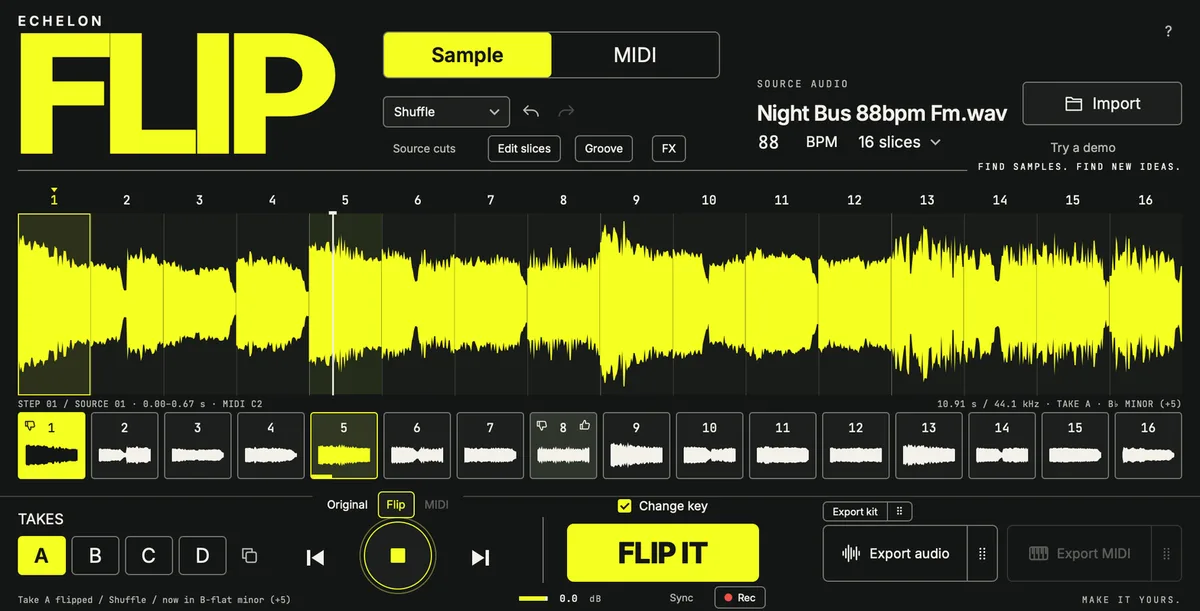
Drop In A Melodic Loop And FLIP Finds Its Tempo, Downbeat And Key, Then Cuts It On Its Own Beat Grid At The Note And Chord Boundaries, Locked To Your DAW’s Bars. Press FLIP IT And It Builds 24 Candidate Flips And Keeps The Most Musical — Phrase Reorders, Octave Lifts, Reversed Swells, Half-Time Holds And Tape-Stops, In Key And On The Bar. Thumbs Up A Cut To Keep It; Thumbs Down Re-Flips Just That One. Made For Melodies, Not Drums.
Hear It Before
You Read About It
- Same Loop, Same Bars: FLIP Reorders Whole Phrases And Re-Chops The Rhythm
- Every Cut Lands On The Loop's Own Beat Grid, In Key
- This Take: Phrases Swapped, A Re-Chopped Bar And A Reversed Bar
A Rearrangement, Not A Processor: The B Side Is The Same Loop's Own Audio, Flipped By One Press Of FLIP IT (16 Slices, Shuffle), So There Is No Before/After Level Or Tone Delta To Measure. Listen For The New Phrase Order.
One Loop. A New Flip Every Press.
FLIP Cuts A Melodic Loop On Its Own Beat Grid And Rearranges It In Key And On The Bar — 24 Candidates Every Press, The Most Musical One Kept.
- 01Finds The Loop’s Tempo, Downbeat And Key, And Cuts It On Its Own Beat Grid
- 02FLIP IT Builds 24 Candidate Flips Per Press And Keeps The Most Musical One
- 03Phrase Reorders, Octave Lifts, Reversed Swells, Half-Time Holds And Tape-Stops
- 04Thumbs Up Keeps A Cut Through Every Flip; Thumbs Down Re-Flips Just That Cut
- 05Change Key Moves The Whole Loop; Export Audio, A Sampler Kit Or The Melody As MIDI

It Finds The Grid.
Tempo, Downbeat And Key, Found As The Loop Loads.

Sliced On The Grid.
2, 4, 8 Or 16 Slices, One Pad Per Slice.

Halftime To Tape Stop.
Whole-Loop FX, And The Waveform Shows The Result.

Audio To MIDI.
Extract The Notes, Drag Them To Your DAW.

One Press, 32 Takes.
Builds 32 Candidate Takes, Keeps The Most Musical.
One-Press Flips For Melodic Loops
A Good Loop Gets Old Fast. Flipping It By Hand Means Chopping On A Grid, Dragging Slices Around, Fixing Clicks At Every Join And Checking That Each Move Still Sits In Key — And Most Of What You Try Sounds Like A Mistake.
FLIP Does The Chopping And The Checking. It Finds The Loop’s Tempo, Downbeat And Key, Cuts At The Note And Chord Boundaries On The Loop’s Own Grid, And Every Press Of FLIP IT Builds 24 Candidates And Keeps The Most Musical: Phrase Reorders, Octave Lifts, Reversed Swells, Half-Time Holds And Tape-Stops That Always Add Up To Exactly The Loop.
In The Session
- 01Turn A Four-Bar Loop Into A New Hook In One Press.
- 02Keep The Cuts You Like And Re-Flip Only The Ones You Don’t.
- 03Move The Whole Flip To A New Key With Change Key.
- 04Drag The Result Out As Audio, A Sampler Kit Or MIDI.
Specs And Formats
- Version
- V1.0.0
- Formats
- VST3 · AU
- Runs On
- macOS + Windows
- Licensing
- iLok · No Dongle
- Installs Via
- Echelon Hub
FLIP In 56.7 Seconds.
FLIP On A Real Loop, On Its Own Faceplate: The Original, Two Presses Of FLIP IT, Change Key Moving The Whole Loop Up A Fourth, Then Keeping One Cut And Re-Flipping Another.
FLIP In A Pack
Any 3 Plugins For $199, Any 5 For $299, Owned Outright.
Pick the units; we’ll show you whether a pack beats buying them one at a time. Flagships (the $149+ units): the Pick 3 includes 1, the Pick 5 2; each beyond that is +$49.
Before You Run FLIP.
Which DAWs Does FLIP Work In?
Logic Pro And GarageBand (AU, macOS); Ableton Live, FL Studio, Cubase, Studio One And Reaper (VST3). It Ships As VST3, AU On macOS And Windows. The Install Guide Covers Where Each Format Lands And How To Rescan If A Host Doesn't See It.
What Are The System Requirements?
macOS: macOS 11+ · Apple Silicon + Intel (Universal). Windows: Windows 10/11 · 64-Bit · VST3 + AAX. Licensing Is iLok; No USB Dongle Is Required.
Does FLIP Add Latency?
FLIP Plays In Real Time. Any Processing Delay It Needs Is Reported To Your DAW, Which Compensates For It Automatically.
Can I Try FLIP Before Buying?
Yes, Through The Subscription: The 7-Day Trial Covers Every Unit, FLIP Included, With Nothing Charged Until It Ends. Individual Plugins And Bundles Don't Have Separate Trials.
Do I Need An iLok Dongle?
No. The License Lives On Your iLok Account And Can Be Activated To Your Computer, To iLok Cloud, Or To A USB Key — Your Choice.
How Do I Install It?
Through The Echelon Audio Hub: Sign In Once, And It Installs, Updates And Rolls Back Every Unit You Own Or Subscribe To.
Are Updates Free?
Yes. A Perpetual FLIP License Includes Every Update To FLIP; Subscribers Get Updates And Every New Unit As It Lands.
What If It Doesn't Work For Me?
Perpetual Licenses Have A 7-Day Refund Window From Purchase, As Long As The License Is Surrendered From Your iLok Account. On The Subscription, Cancelling Inside The Trial Means You Pay Nothing. If Something Is Broken And Support Can't Fix It, We'll Make It Right Regardless.
System Requirements
| Version | V1.0.0 |
|---|---|
| Formats | VST3 · AU |
| macOS | macOS 11+ · Apple Silicon + Intel (Universal) |
| Windows | Windows 10/11 · 64-Bit · VST3 + AAX |
| Licensing | iLok · Machine, Cloud Or USB |
| Delivery | Echelon Audio Hub |
Goes With FLIP
Run FLIP Tonight.
All 49 Units Free For 7 Days, Or Own FLIP Outright For $79.