
SIFT
Frequency-Targeted De-Esser
macOS (Universal) + Windows · iLok · VST3 · AU · AAX
Pick How You Pay
One Payment And It Is Yours. Perpetual · Free Updates.
From 3 To 12 Months, No Interest. Yours After The Last Payment.
6 × $16.50, Then SIFT Is Yours · $99.00 total, No Interest. Cancel Or Pay Off Anytime. USD.
SIFT And The Other 48 Plugins. The Trial Covers All 49, Then $17.99/mo.
Try Free For 7 DaysmacOS (Universal) + Windows · iLok · New Plugins Drop Every Friday · Buy Goes Straight To Checkout.
Not Today? So It’s Easy To Find Again.
Esses Gone. Air Still There.
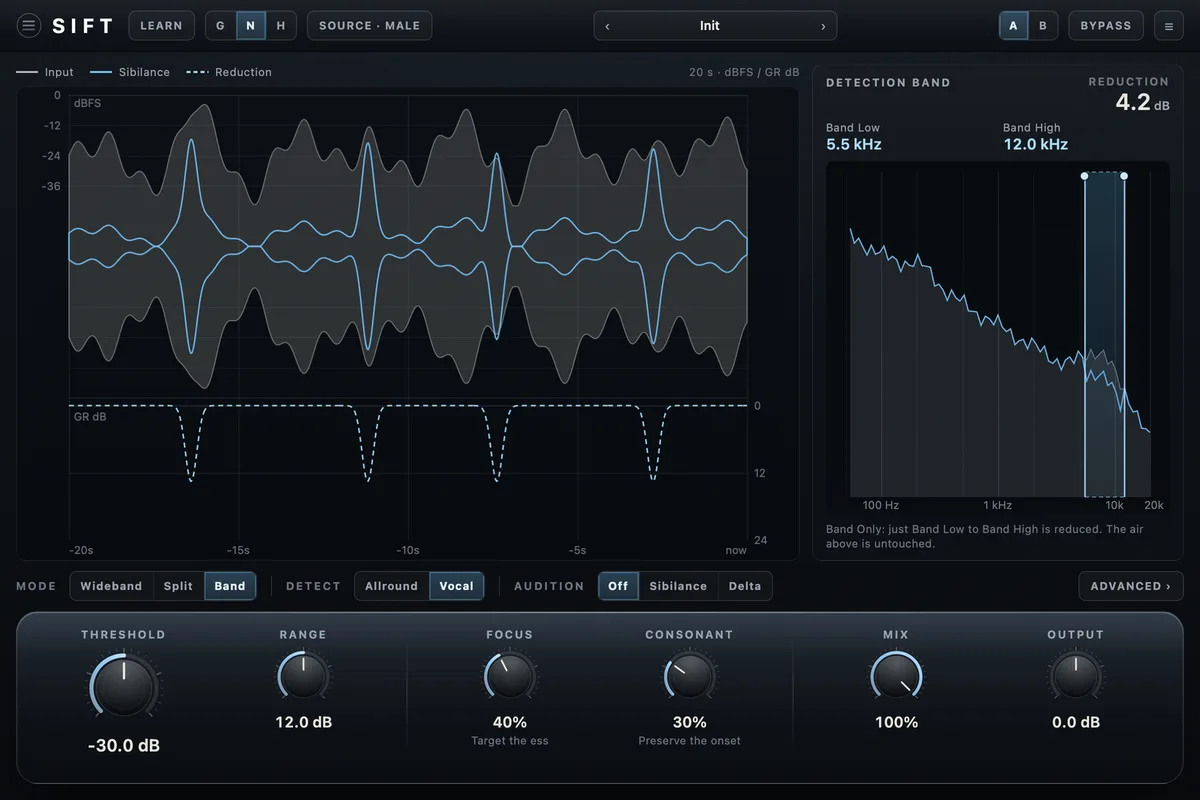
Wideband, Split Or Band Only Reduction On A Detection Band You Set — Or Press LEARN And SIFT Proposes One From The Take.
Take The Ess Out Without Taking The Air With It. Set The Detection Band By Hand, Or Press Learn And SIFT Proposes One From The Take — Then Reduce The Whole Signal, Everything Above The Band, Or The Band Alone, With Twenty Seconds Of Input, Sibilance And Reduction On One Timeline.
- 01Wideband, Split, Or Band Only — The Air Above The Band Stays Untouched
- 02Learn Proposes The Band And The Threshold; Keep It Or Undo It
- 03Focus Targets The Ess, Consonant Keeps The Word Start
- 04Twenty Seconds Of Input, Sibilance And Gain Reduction On One Timebase
- 05Zero Added Latency At The Default Settings · Up To 4× Oversampling

Take The Ess Out
Without Taking The Air With It.

One Shared Timebase
Input, Sibilance And Gain Reduction On One Timeline.

Consistent Take To Take
Threshold Floats With Level, So De-Essing Stays Consistent.

Press Learn
It Proposes The Band And The Threshold; Keep Or Undo.

Wideband. Split. Band Only.
Band Only Leaves The Air Above The Band Untouched.
Frequency-Targeted De-Esser
De-Essing Is Usually A Trade. The Setting That Finally Kills The Ess Takes The Top Off The Whole Vocal, So You Back It Off — And The Ess Is Back On The Loud Words.
SIFT Only Reduces What You Point It At. Band Only Attenuates The Detection Band And Leaves Everything Above It Alone, So The Air On A Bright Vocal Stays Where You Put It. FOCUS Keeps The Detector On The Ess Instead Of The Body, CONSONANT Lets The Word Start Through, And Twenty Seconds Of Input, Sibilance And Gain Reduction Share One Timeline — So You Can See Whether It Moved On The Words You Think It Did.
In The Session
- 01Reduce The Band And Keep The Air Above It.
- 02Press LEARN, Read The Proposal, Keep It Or Undo It.
- 03Audition The Sibilance To Confirm It Is Catching Esses And Nothing Else.
- 04Add Lookahead Only When You Need It — The Default Adds No Latency.
Specs And Formats
- Version
- V1.1.2
- Formats
- VST3 · AU · AAX
- Runs On
- macOS + Windows
- Licensing
- iLok · No Dongle
- Installs Via
- Echelon Hub
SIFT In 31 Seconds.
What SIFT Does, A Tour Of Its Current Faceplate, And The Quick Facts. No Audio — There Is No Rendered A/B For SIFT Yet.
SIFT In A Pack
Any 3 Plugins For $199, Any 5 For $299, Owned Outright.
Pick the units; we’ll show you whether a pack beats buying them one at a time. Flagships (the $149+ units): the Pick 3 includes 1, the Pick 5 2; each beyond that is +$49.
Which De-Esser?
Same Job, Three Amounts Of Control.
Every Look-Alike, Side By Side →Before You Run SIFT.
Which DAWs Does SIFT Work In?
Pro Tools (AAX); Logic Pro And GarageBand (AU, macOS); Ableton Live, FL Studio, Cubase, Studio One And Reaper (VST3). It Ships As VST3, AU, AAX On macOS And Windows. The Install Guide Covers Where Each Format Lands And How To Rescan If A Host Doesn't See It.
What Are The System Requirements?
macOS: macOS 11+ · Apple Silicon + Intel (Universal). Windows: Windows 10/11 · 64-Bit · VST3 + AAX. Licensing Is iLok; No USB Dongle Is Required.
Does SIFT Add Latency?
Where The Engine Needs Lookahead Or Oversampling, SIFT Reports Its Latency To Your DAW, Which Compensates Automatically, So It Stays In Time With The Rest Of The Session. On A Live Input, Check Your Host's Low-Latency Or Monitoring Mode.
Can I Try SIFT Before Buying?
Yes, Through The Subscription: The 7-Day Trial Covers Every Unit, SIFT Included, With Nothing Charged Until It Ends. Individual Plugins And Bundles Don't Have Separate Trials.
Do I Need An iLok Dongle?
No. The License Lives On Your iLok Account And Can Be Activated To Your Computer, To iLok Cloud, Or To A USB Key — Your Choice.
How Do I Install It?
Through The Echelon Audio Hub: Sign In Once, And It Installs, Updates And Rolls Back Every Unit You Own Or Subscribe To.
Are Updates Free?
Yes. A Perpetual SIFT License Includes Every Update To SIFT; Subscribers Get Updates And Every New Unit As It Lands.
What If It Doesn't Work For Me?
Perpetual Licenses Have A 7-Day Refund Window From Purchase, As Long As The License Is Surrendered From Your iLok Account. On The Subscription, Cancelling Inside The Trial Means You Pay Nothing. If Something Is Broken And Support Can't Fix It, We'll Make It Right Regardless.
System Requirements
| Version | V1.1.2 |
|---|---|
| Formats | VST3 · AU · AAX |
| macOS | macOS 11+ · Apple Silicon + Intel (Universal) |
| Windows | Windows 10/11 · 64-Bit · VST3 + AAX |
| Licensing | iLok · Machine, Cloud Or USB |
| Delivery | Echelon Audio Hub |
Goes With SIFT
Run SIFT Tonight.
All 49 Units Free For 7 Days, Or Own SIFT Outright For $99.